Introducing Durable Cron Jobs for Rivet Actors
Durable, timezone-aware Cron jobs that let actors sleep between executions and wake on schedule indefinitely.

Cron jobs are now built into Rivet Actors. Schedules wake actors on demand and survive sleep, restarts, deploys, and crashes. Use standard five-field expressions with an optional timezone, and inspect recent runs from the Rivet Inspector.
Sleep Between Runs
Actors do not need to stay awake while waiting for their next run. After an action finishes and the actor becomes idle, it can sleep normally. Rivet wakes it when the next action is due, even when that run is arbitrarily far in the future. Recurring schedules continue indefinitely until they are updated or deleted.
Schedule with Crontab and a Timezone
Use c.cron.set with a standard five-field crontab expression. Add an IANA timezone when the schedule should follow local time.
await c.cron.set({
	name: "daily-report",
	expression: "0 9 * * *",
	timezone: "America/Los_Angeles",
	action: "runReport",
	maxHistory: 20,
});
Schedule at Fixed Intervals
Use c.cron.every for jobs that repeat after a fixed interval.
await c.cron.every({
	name: "refresh-cache",
	interval: 60_000,
	action: "refreshCache",
});
Inspect Run History
Use c.cron.history to inspect recent runs for a named job.
const runs = await c.cron.history("daily-report", { limit: 10 });
Run One-off Jobs
The existing c.schedule.at and c.schedule.after APIs run an action once at an exact timestamp or after a delay.
await c.schedule.at(Date.parse("2026-08-01T09:00:00Z"), "openSale", "summer");
await c.schedule.after(30_000, "sendReminder", "reminder-123");
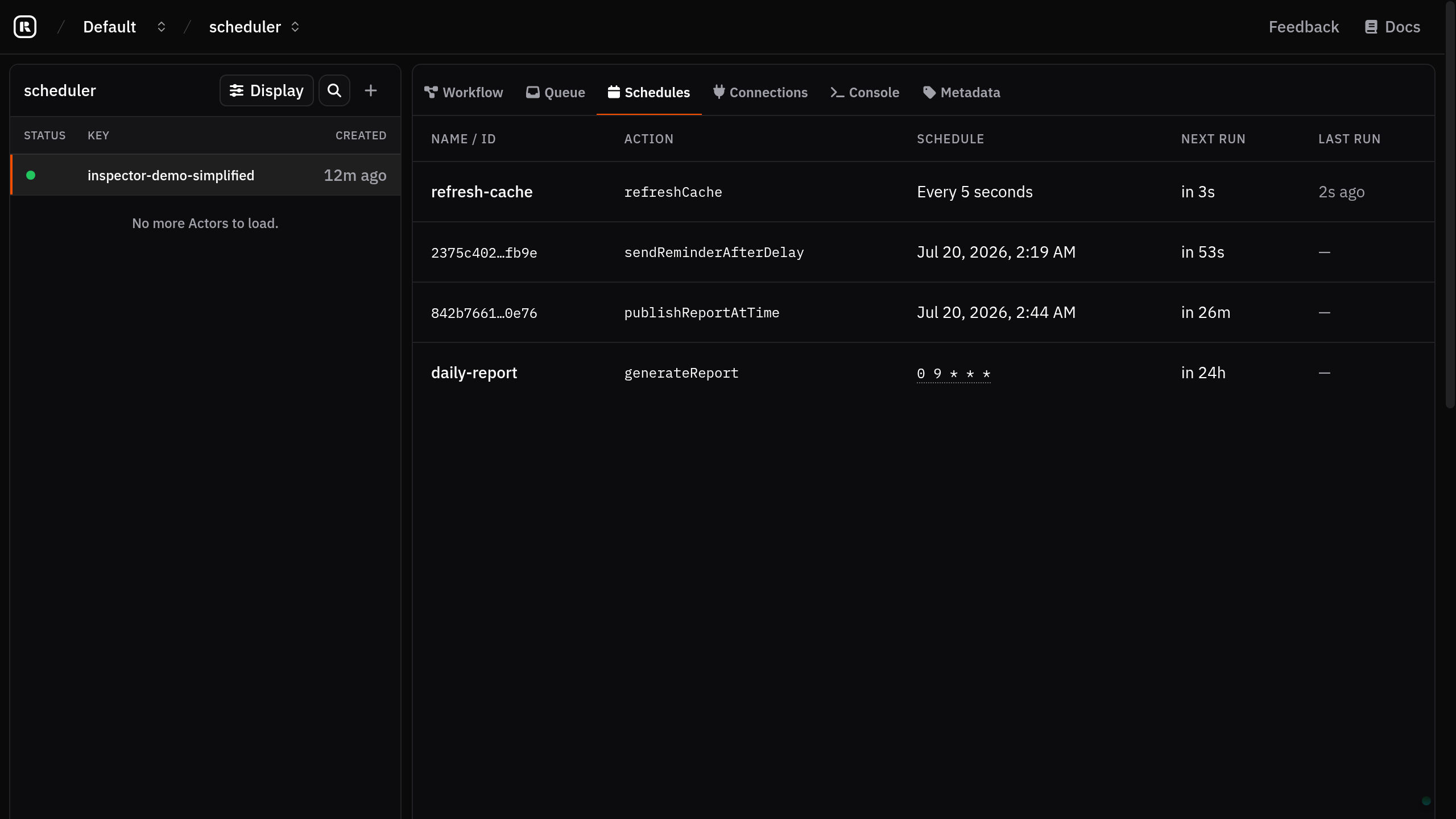
Inspect Schedules in the Dashboard
View one-off and recurring jobs in the Rivet dashboard, including each action, schedule, next run, and last run.
Full Actor Examples
const reminders = actor({
	onCreate: async (c) => {
		await c.schedule.after(30_000, "sendReminder", "reminder-123");
	},
	actions: {
		sendReminder: (_c, reminderId: string) => {
			console.log("Sending reminder", reminderId);
		},
	},
});
const reports = actor({
	onCreate: async (c) => {
		await c.cron.set({
			name: "daily-report",
			expression: "0 9 * * *",
			action: "runReport",
			args: ["sales"], // Optional.
			timezone: "America/Los_Angeles", // Optional; defaults to UTC.
			maxHistory: 100, // Optional; defaults to 100. Set to 0 to disable.
		});
	},
	actions: {
		runReport: (_c, report: string) => {
			console.log("Running report", report);
		},
	},
});
const cache = actor({
	onCreate: async (c) => {
		await c.cron.every({
			name: "refresh-cache",
			interval: 60_000, // Minimum 5 seconds.
			action: "refreshCache",
			args: ["products"], // Optional.
			maxHistory: 100, // Optional; defaults to 100. Set to 0 to disable.
		});
	},
	actions: {
		refreshCache: (_c, cache: string) => {
			console.log("Refreshing cache", cache);
		},
	},
});